


Toast - Local Restaurants
4.85.42K Reviews
App Specs
- Version
- 3.10.0-production
- Updated On
- License
- Free
- Downloads
- 1,000,000+
- Developer
- Toast, Inc.
- Categories
- Food & Drink
- Platform
- Android, iOS
Screenshots
 Analysis by AppCompare
My main takeaway from trying Toast - Local Restaurants is that it is most useful when a meal is already taking shape in your mind: you know roughly where you want to eat, or what you want, and you need a practical next step. Restaurant discovery can be fun, but the value here is also in moving from browsing to deciding. That shift depends on having a working connection, so I’d treat it as a handy companion for planning rather than a replacement for every way of finding food.
When a connection makes the difference
Nearby results, restaurant details, and ordering are the parts of the experience that naturally rely on fresh information. In my use, that makes Toast best suited to moments when I can get online and give the app a little attention: choosing lunch before leaving the office, checking a place while walking through a neighborhood, or arranging food before friends arrive. It is less useful as a plan to depend on when I already know I will have no signal.
That connection also changes how I would use the app while deciding. I like to compare a restaurant’s hours and menu with the kind of meal I actually want, rather than settle on the first appealing photo. If service is slow or spotty, I would avoid repeatedly changing filters and starting over. I’d first narrow down the meal and area, then check a small number of likely places while the connection is steady.
Useful in everyday mobile situations
A realistic use for me is a busy weekday lunch: I have a short break, don’t want to walk around guessing, and would rather see nearby choices before heading out. Toast can help me turn that vague “where should I eat?” moment into a shortlist. For an evening out, I’d use it earlier, while I have time to compare profiles and make a reservation instead of trying to do all the planning on the way there.
It also suits someone who enjoys trying local restaurants but doesn’t want every meal to involve a long search across separate review, map, and ordering tools. The trade-off is that an app focused on restaurant discovery cannot remove the practical differences between places. A listing can help me choose, but I still need to check whether the restaurant’s current hours and menu fit my plans, especially if the timing is tight.
What to do when things do not go smoothly
If nearby options take a while to appear, I would check my connection and location settings before assuming there are no restaurants to choose from. A broad search can also be more useful than a very specific one when I’m in an unfamiliar area. Once I find a promising place, I’d note its name and address before moving into a busier stretch with poor reception, so I’m not relying on a fresh search at the last moment.
For an order, I’d review the selected items and any customizations before submitting. That is a sensible habit in any ordering app, but it matters particularly when I’m distracted or on a weak connection: I want to be sure the choice I intended is the one I’m acting on. If an action seems to stall, I’d pause and check its status rather than tap repeatedly, which could make it harder to tell whether the first attempt went through.
Worth Reading Before You Choose

EA SPORTS FC Mobile 26 Is a Bigger Football Game, but It Takes Time

Flipboard Shows What News Apps Must Do Beyond the Feed

Switching to Android Auto Means Rethinking Your Driving Routine

Google Calendar Makes a Crowded Week Easier to Manage

Ludo King Makes the Most of the Minutes Between Plans

Baby Panda World Brings Quick Play to Modern Phones, but Its Game Library Feels Busy
Keeping mobile use deliberate
Restaurant photos and profile details are helpful, but browsing them for every option can be a slow way to decide when I’m using mobile data or trying to save battery. My approach would be to start with the practical questions—location, hours, food type, and whether I need a reservation or takeout—then open extra details only for the finalists. That keeps the search focused without giving up the useful context that makes restaurant profiles more than a bare list.
Toast is free, and its Everyone age rating makes it broadly suitable for diners of different ages. It is developed by Toast, Inc., and the app is in the Food & Drink category. The current version is 3.8.0-production, with Android 8.0 as the minimum operating system. Those details make it easy to judge whether it fits an Android phone, while the core appeal is the same: finding a restaurant and taking the next step from a phone.
Diving Into the User Experience
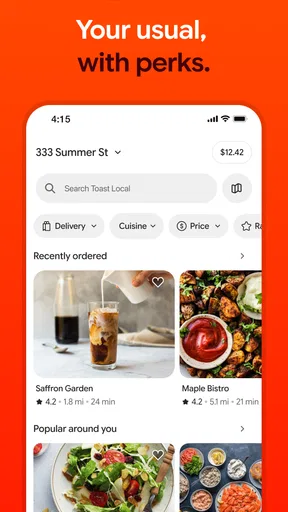
First off, the user interface is super clean and intuitive. The moment you open the app, you're greeted with a slick design that doesn't overwhelm you with too much info. It's all about getting you to those tasty spots quickly and efficiently. The app uses your location to pull up a variety of nearby restaurants, and it does so pretty darn fast.
I was impressed with how easy it was to filter results by cuisine type, price range, and even specific dietary needs. Whether you're in the mood for a greasy burger or a vegan salad, Toast - Local Restaurants has got you covered. The search function is robust, allowing you to find exactly what you're craving with just a few taps.
A Treasure Trove of Information
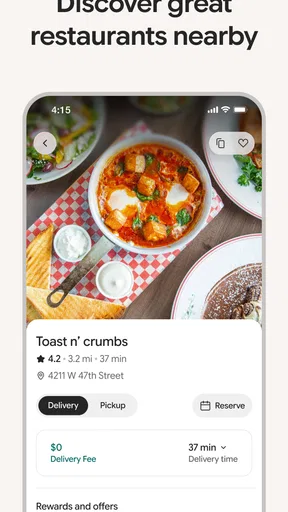
One of my favorite features is the detailed restaurant profiles. Each listing includes a mouth-watering menu preview, opening hours, and even a little background on the establishment. It's like having your own personal food critic at your fingertips. Plus, the user reviews are super helpful. They're generally insightful and add a nice personal touch to the decision-making process.
Another cool aspect is the photo gallery for each restaurant. These aren't just stock images; they come from real customers who have shared their experiences. It feels like a more genuine peek into what you can expect from the place.
Making Reservations and Orders
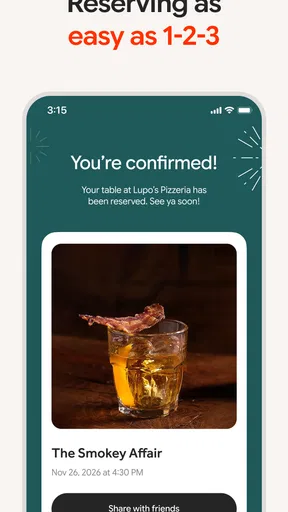
In today's fast-paced world, convenience is king, and Toast understands that. The app allows you to make reservations directly, which is a total game-changer if you're planning a night out. No more endless phone calls trying to book a table—just a few clicks and you're all set.
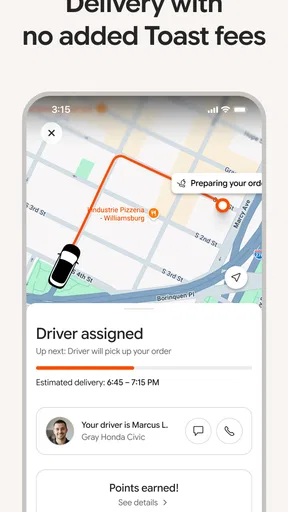
And if you're more in the mood for a cozy night in, the app also facilitates takeout orders. The process is seamless, and you can customize your order to your heart's content. It’s like having the best local eateries right at your doorstep.
A Social Element
What’s a dining experience without a little social sharing? Toast incorporates a social element where you can follow friends, share your food adventures, and see where your buddies are dining. It’s a fun way to discover new places and maybe even join a friend for a spontaneous meal.
Comparing it with other ways to choose
Compared with opening a general maps app, Toast puts restaurant information and the decision to reserve or order closer together. Maps can be better when I need directions above all else, while a restaurant’s own ordering channel may be the clearer choice if I already know exactly where I want to eat. I see Toast as most helpful in the middle: when I want to discover a place and then act without switching between several separate searches.
It is also a different experience from asking friends directly. A friend can give a personal recommendation that matches my taste, but Toast’s profiles, reviews, and photos let me explore at my own pace and compare more than one option. The social element can bridge those approaches, though I would not choose a restaurant solely because a friend is following or sharing it. I’d still check the menu and practical details for myself.
Who will get the most from it
I’d recommend it to people who eat out or order takeout often enough to appreciate having discovery and next steps in one place, especially anyone who enjoys finding independent local spots rather than defaulting to the same familiar meal. It can also help a group narrow down choices: one person can look for a cuisine or dietary fit, while everyone weighs in on the restaurant profile before the plan is settled.
On the other hand, someone who rarely eats out, prefers cooking at home, or already has a trusted restaurant and ordering routine may not gain much from another food app. It is also not my first choice when I only need turn-by-turn directions or when I cannot rely on a mobile connection. In those cases, a maps app, a direct call, or the restaurant’s own channel may be the more straightforward tool.
Small habits that make decisions easier
One useful way to avoid indecision is to decide what matters most before searching: a nearby location, a particular cuisine, a dietary need, or a comfortable price range. Then I’d use the matching filters and keep the shortlist small. This is more effective than browsing every photo and review, and it makes the app’s different kinds of information work together instead of turning the search into an endless scroll.
For a group meal, I would check dietary needs before anyone gets attached to a restaurant, then use the menu preview to see whether the choice works for the whole table. For a solo lunch, speed may matter more than atmosphere, so hours and location are the first checks I’d make. Those are small distinctions, but they prevent a promising profile from becoming an inconvenient plan.
Reputation and practical expectations
The app has a 4.8 average from around 31,000 ratings, and it has been installed over a million times. I take that as a sign that it has found a sizeable audience, not as a guarantee that every restaurant listing or experience will suit me. Restaurant choices are personal, and reviews can reflect different expectations, so I use them as context rather than a final verdict.
It was released on March 9, 2020, and the current version is 3.8.0-production. For me, the more important question than version history is whether the app fits the way I actually make meal plans: searching nearby, checking details, then reserving or ordering. If that is already part of my routine, a dedicated app can reduce some friction; if not, its extra options may simply be more than I need.
Final Thoughts
After spending some quality time with Toast - Local Restaurants, I can confidently say it's a must-have app for anyone who loves exploring local food scenes. From its user-friendly interface to its wealth of information and social features, it’s designed to enhance your culinary journeys.
So, if you're ready to spice up your dining experiences, give Toast a try. You might just find your new favorite spot around the corner, and who knows, maybe I’ll see you there!
My recommendation comes with one practical condition: use it when you have a reliable connection and a little time to make a choice, rather than waiting until you are already rushed or offline. I’d keep it on my phone for exploring nearby restaurants, checking the details that matter to my plans, and moving toward a reservation or takeout order. If that sounds like how you choose meals, it is an easy app to justify trying; if your needs are limited to directions or one familiar restaurant, a simpler option may serve you better.
Pros
- User-friendly interface for easy navigation.
- Wide selection of local eateries.
- Real-time menu updates.
- Secure in-app payment options.
- Personalized recommendations based on preferences.
Cons
- Limited to certain geographic areas.
- Occasional app crashes reported.
- Some menus lack detailed descriptions.
- Notifications can be overwhelming.
- Limited customer support hours.
FAQs for Toast - Local Restaurants
What is Toast - Local Restaurants app about?
Toast - Local Restaurants is an app designed to enhance your dining experience by connecting you with local eateries. It offers features like menu browsing, online ordering, reservations, and customer reviews, making it easier to discover and enjoy meals from nearby restaurants. It aims to support local businesses and provide convenience to foodies.
Is Toast - Local Restaurants app free to use?
Yes, the Toast - Local Restaurants app is free to download and use. While the app itself does not charge users, be aware that standard charges for meals and delivery, if applicable, will apply. Some restaurants may also have service fees, so check individual listings for details.
Can I make reservations through the Toast app?
Absolutely! Toast - Local Restaurants allows you to make reservations at participating local eateries directly through the app. Simply browse the restaurant's page, check availability, and book a table for your preferred date and time. This feature makes dining out more convenient and hassle-free.
How does the app support local restaurants?
The Toast app supports local restaurants by providing them with a platform to reach more customers. It allows eateries to showcase their menus, offer promotions, and manage orders efficiently. By using the app, users contribute to the local economy and help small businesses thrive in their communities.
Are there any customization options for orders in Toast app?
Yes, the Toast app offers customization options for your orders. When you select an item from a restaurant’s menu, you can often add special instructions or modify ingredients according to your preferences. This ensures that your meal is prepared exactly how you like it, enhancing your dining experience.


